The Query That Found Nobody
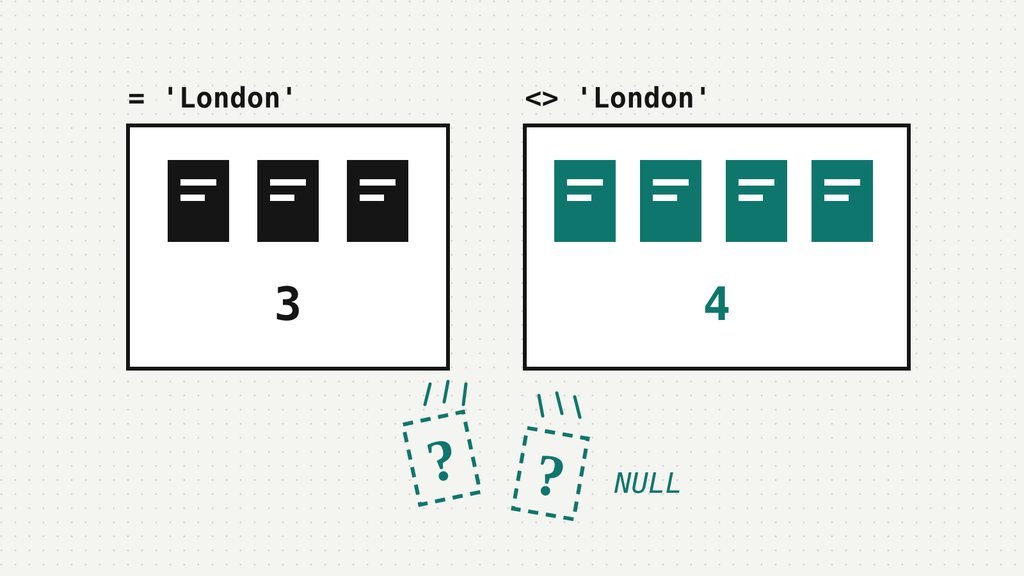
Nine customers went into two lists, and seven came out.
They belong to a small online bookshop we made up. The shop was holding a signing in London and sending a discount code to everyone else, so someone wrote the two obvious queries. Every customer is either in London or not in London. That’s what “not” is for.
SELECT COUNT(*) FROM customers WHERE city = 'London';   -- the signing
SELECT COUNT(*) FROM customers WHERE city <> 'London'; -- the code| list | customers |
|---|---|
| London (the signing) | 3 |
| not London (the code) | 4 |
| both lists together | 7 |
| rows in customers | 9 |
Three plus four is seven, and the table has nine rows. Two customers were invited to nothing. Neither query threw an error, and neither list was wrong on its own; they were just short, together, by two people.
So where did the two go? Nobody deleted them. They were in the table the whole time, which is somehow worse.
Count the rows, then count the values
The quickest way to find missing people is to count them twice. COUNT(*) counts rows. COUNT(city) counts rows where city holds a value. Those sound like the same thing right up until the moment they aren’t.
SELECT COUNT(*)             AS all_rows,
       COUNT(city)          AS with_city,
       COUNT(DISTINCT city) AS cities
FROM customers;| all_rows | with_city | cities |
|---|---|---|
| 9 | 7 | 4 |
Nine rows, seven cities. Two customers, Dev and Gus, have no city at all: the column holds NULL. Perhaps they signed up before the form asked; perhaps they skipped the box. The table doesn’t say, and that’s exactly what NULL means. Not “nowhere”. Not an empty string. Just “we don’t know”.
Which moves the mystery along a step rather than solving it. As far as whoever wrote the query was concerned, anyone without a London address was “not London”, and Dev and Gus have no address at all. So why didn’t city <> 'London' pick them up?
Neither true nor false
Because SQL never said “no”. Ask it whether an unknown city is London and the honest answer is “I don’t know”, so that’s the answer you get. Any ordinary comparison with NULL comes back NULL, even NULL = NULL. Here’s the evidence, first from SQLite, which writes true as 1:
SELECT NULL = NULL       AS a,
       NULL <> 'London' AS b,
NULL IS NULL AS c;| a | b | c |
|---|---|---|
| NULL | NULL | 1 |
DuckDB says the same thing with the words NULL, NULL and true. This is three-valued logic: a condition can be TRUE, FALSE or UNKNOWN, and SQL writes UNKNOWN as NULL. It would be harmless if WHERE treated UNKNOWN as a shrug. It doesn’t. WHERE keeps the rows whose condition is TRUE, and only those. A row doesn’t have to fail the test to be thrown out. It just has to not pass it.
The cure is to be explicit about the unknowns. If “not London” should include “we don’t know”, put that in the query, either by hand or with an operator built for it. IS DISTINCT FROM treats NULL as a value like any other, so it can only answer yes or no.
-- say "not London, or we don't know" out loud
WHERE city <> 'London' OR city IS NULL

-- or let the operator say it (DuckDB, PostgreSQL, SQLite)
WHERE city IS DISTINCT FROM 'London'
Both versions return 6 customers in SQLite and DuckDB, and 3 plus 6 is 9. Everyone is on a list. Notice, though, that this is a decision rather than a repair. Dev might live in Camden. You’ve chosen to send him a discount code for a signing he could have walked to, and that’s a choice SQL is happy to make for you only if you write it down.
And that was the gentle version. A NULL in the filtered column only loses the rows it sits on. The nastier trick is a NULL that loses rows it isn’t even on.
The second disappearance
Next job: a win-back email for customers who have never ordered anything. The orders table has 8 orders from six known customers (Ada ordered twice), so a glance says three people have never bought a thing: Dev, Gus and Ivo. The query practically writes itself.
SELECT customer_id, name
FROM customers
WHERE customer_id NOT IN (SELECT customer_id FROM orders)
ORDER BY customer_id;| customer_id | name |
|---|---|
| (no rows) |
No rows, and nothing anywhere to suggest that’s wrong: an empty result reads exactly like good news. Every customer has ordered! Cancel the campaign, and send someone a nice note about retention.
Except we can see three customers who haven’t. So which is lying, the table or the query? Same trick as before: count twice.
SELECT COUNT(*)           AS orders,
       COUNT(customer_id) AS with_customer
FROM orders;| orders | with_customer |
|---|---|
| 8 | 7 |
One order has no customer. Order 108 was a guest checkout: someone bought £40 of books without signing in, so its customer_id is NULL. One stranger, one order. How does that hide three customers who have nothing to do with it?
What NOT IN is really asking
Unfold it. x NOT IN (a, b, c) is shorthand for x <> a AND x <> b AND x <> c. For Ivo, customer 9, the subquery hands back 1, 2, 3, 5, 6, 8, 1 and NULL. Nine isn’t 1, isn’t 2, and so on: TRUE, seven times. Then comes the last test, 9 <> NULL, which is UNKNOWN. And TRUE AND UNKNOWN is UNKNOWN, because an AND with an unknown part might still turn out false. So Ivo’s condition isn’t TRUE, and WHERE turns him away. Same for Dev, same for Gus. Customers who have ordered fail on their own id, which is FALSE, so they were never going to be on the list.
Put it together. Once there’s a NULL in the list, NOT IN can come out FALSE or UNKNOWN, and never TRUE.
One NULL in the list,
and NOT IN means NOT ANYONE.
You can watch it happen without any tables at all:
SELECT 4 NOT IN (1, 2, NULL) AS four,
       1 NOT IN (1, 2, NULL) AS one,
4 IN (1, 2, NULL) AS four_in;| four | one | four_in |
|---|---|---|
| NULL | 0 | NULL |
That’s SQLite again; DuckDB prints NULL, false, NULL. Look at the last column, because the asymmetry matters. IN with a NULL in the list is mostly harmless: a match is still TRUE, and a non-match was going to be dropped anyway. The IN version of our query finds the six customers who have ordered, exactly right. It’s the NOT that turns one stray NULL into an empty list.
Ask a question NULL can’t spoil
The sturdy fix is NOT EXISTS. It doesn’t compare a customer with every value in a list. It asks whether a matching order exists, and “is there a row?” only ever has two answers.
SELECT c.customer_id, c.name
FROM customers AS c
WHERE NOT EXISTS (
  SELECT 1 FROM orders AS o
  WHERE o.customer_id = c.customer_id
)
ORDER BY c.customer_id;| customer_id | name |
|---|---|
| 4 | Dev |
| 7 | Gus |
| 9 | Ivo |
Dev, Gus and Ivo, present and correct. If you’d rather keep NOT IN, add WHERE customer_id IS NOT NULL inside the subquery and you’ll get the same three. That works because you remembered. NOT EXISTS works when you forget, which in our experience is the more common condition.
WHEREkeeps TRUE only. A comparison withNULLis UNKNOWN, so the row goes.- Before you trust a filter, compare
COUNT(*)withCOUNT(column). A gap means NULLs. - “Not equal” doesn’t include “unknown”. Use
IS DISTINCT FROMor addOR col IS NULL, and decide on purpose. - Never put
NOT INin front of a subquery that can returnNULL. UseNOT EXISTS.
We ran every query here in SQLite 3.45.1 and DuckDB 2.0.0, and they agreed on every result. PostgreSQL documents the same rules. One DuckDB extra: a list in square brackets, [1, 2, NULL], isn’t poisoned by its NULL; the subquery and the (1, 2, NULL) forms above are.
The column that used to be clean
Here’s what makes these bugs so durable. Both queries in this story were correct on the day they were written, if neither column had a NULL in it that day. Then the sign-up form made the city optional. Then the shop switched on guest checkout. Nobody touched the SQL, and the SQL never complained.
Every team has a column like that: one everybody treats as never empty, which the table itself has never been told must be filled in. Nobody has written its NOT NULL down, because nobody thinks they need to. Which one is yours?
References
- Logical Operators & Boolean Logic (PlexPrep lesson) — AND, OR, NOT and three-valued logic, with a ten-question quiz
- Filtering NULLs in Aggregations (PlexPrep lesson) — COUNT(*), COUNT(col), SUM and AVG around NULLs, with quizzes
- SQL Joins Without Surprises (cheat sheet) — NULL keys and NOT IN, every query run in DuckDB
- Data Quality Checks in SQL (cheat sheet) — ends with the NULL trap that lets a missing value pass a rule
- The PlexQuest SQL guide — the Keep’s own NULL rules, in SQLite
- The Running Total That Counted Tomorrow — a window frame that counted a whole day when we asked for one receipt
- SQLite: SQL Language Expressions — operators return NULL when an operand is NULL; IS DISTINCT FROM; the IN and NOT IN result table
- SQLite: Built-in Aggregate Functions — count(X) counts non-NULL values, count(*) counts rows
- PostgreSQL: Logical Operators — the three-valued truth tables for AND, OR and NOT
- PostgreSQL: Comparison Functions and Operators — 7 = NULL yields null; IS DISTINCT FROM
- PostgreSQL: Subquery Expressions — NOT IN is null, not true, when a right-hand row is null
- DuckDB: NULL Values — any comparison with NULL returns NULL, including NULL = NULL
- DuckDB: IN Operator — NULL on the right-hand side, and why lists behave differently
Related essays
▱
Data quality
|

▱
SQL
|
▱
SQL
|
Comments
No comments yet. Be the first to share your thoughts.