The Running Total That Counted Tomorrow
Here is a running total that knows the future.
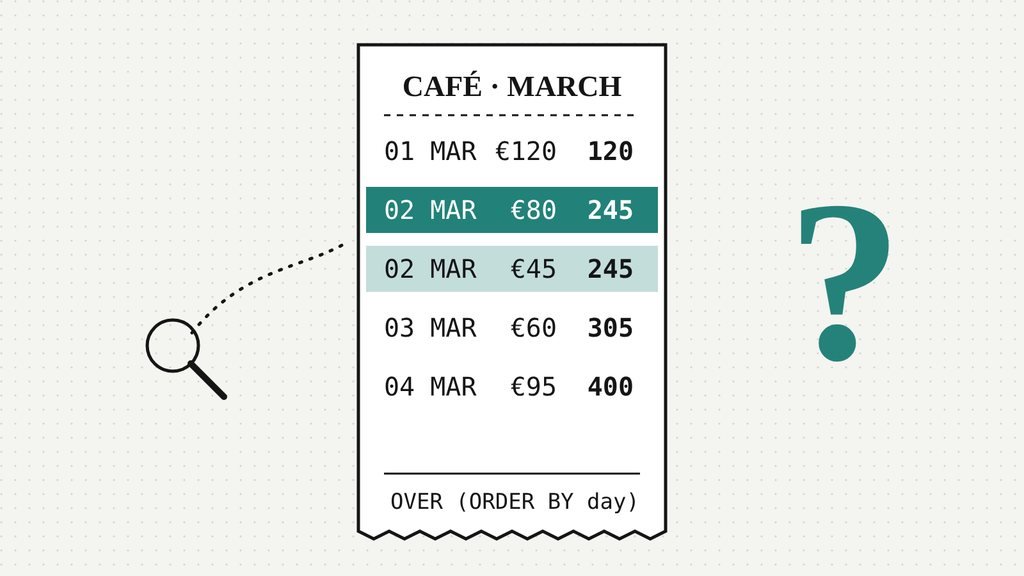
Five receipts from a small café, four days in early March. Nothing exotic: a date, an amount, an id. You want the takings to date beside each receipt, so you write the window function everyone writes, the one from every tutorial, the one you could type with your eyes closed. Which, it turns out, is roughly how most of us have been typing it.
SELECT receipt_id, sale_date, amount,
       SUM(amount) OVER (ORDER BY sale_date) AS running
FROM sales
ORDER BY receipt_id;| receipt_id | sale_date | amount | running |
|---|---|---|---|
| 1 | 2026-03-01 | 120 | 120 |
| 2 | 2026-03-02 | 80 | 245 |
| 3 | 2026-03-02 | 45 | 245 |
| 4 | 2026-03-03 | 60 | 305 |
| 5 | 2026-03-04 | 95 | 400 |
Look at receipt 2. It’s an €80 order, rung up on the 2nd of March, and the running total beside it says €245. But at that moment the till held €200: €120 from the first day and €80 from this receipt. The other €45 hadn’t happened yet. Receipt 3 was still, presumably, deciding between oat and almond.
So either the database can see the future, or the query is doing exactly what it was told. Honestly, it’s hard to say which is worse.
Rounding up the usual suspects
We did what anyone does with a number that looks wrong: we blamed something else.
Duplicates? No. Five receipts in, five rows out. Time zones? The dates are plain dates; there’s no clock to drift. A bug in the engine, then? We ran the same query in SQLite and in DuckDB. Both said €245. When two witnesses who’ve never met tell the same story, it’s usually your story that needs work.
Which leaves the one suspect nobody interrogates: the part of the query you didn’t write.
The query you wrote isn’t the query that ran
Every aggregate window function (SUM, AVG, COUNT and friends), plus FIRST_VALUE and LAST_VALUE, looks at a frame, the set of rows it’s allowed to see from wherever it’s standing. (Ranking functions like ROW_NUMBER ignore it.) You can spell the frame out. If you don’t, SQL quietly fills one in for you, and the moment your OVER has an ORDER BY, the frame it fills in is this:
RANGE BETWEEN UNBOUNDED PRECEDING
      AND CURRENT ROW
Read that slowly, because the whole mystery hides in one word. Most of us read it as the picture below: start at the top, stop at me, ignore everything after.
That picture is correct for ROWS. The default isn’t ROWS.
The word is RANGE
ROWS counts physical rows: “current row” means this row and nothing else. RANGE counts values: “current row” means every row whose ORDER BY value equals this one’s. SQL calls them peers. Receipts 2 and 3 share a date, so as far as the frame is concerned, they’re the same moment. Stand on either one and the frame takes both.
It wasn’t counting tomorrow.
It was counting the whole day.
Here’s the part worth sitting with: the database was right all along. You ordered by date, and by the close of the 2nd of March, the takings to date really were €245. You asked for running totals by day and got them, just printed once per receipt instead of once per day. The bug is the gap between the sentence in your head and the sentence in the query.
The fix, and the small print in the fix
Say what you mean. Ask for rows, and give the order a tiebreaker:
SELECT receipt_id, sale_date, amount,
       SUM(amount) OVER (
         ORDER BY sale_date, receipt_id
         ROWS BETWEEN UNBOUNDED PRECEDING AND CURRENT ROW
       ) AS running
FROM sales
ORDER BY receipt_id;| receipt_id | sale_date | amount | running |
|---|---|---|---|
| 1 | 2026-03-01 | 120 | 120 |
| 2 | 2026-03-02 | 80 | 200 |
| 3 | 2026-03-02 | 45 | 245 |
| 4 | 2026-03-03 | 60 | 305 |
| 5 | 2026-03-04 | 95 | 400 |
Receipt 2 is back to €200. Notice the receipt_id after the date, though. Without it, receipts 2 and 3 are still a tie, and the engine is free to put either one first, so receipt 2 could say €200 today and €245 after the next upgrade, index or query-plan change. ROWS without a tiebreaker isn’t a fix. It’s letting the engine pick your answer.
Strictly speaking, the tiebreaker on its own already fixes this: once the ORDER BY is unique there are no peers, and RANGE and ROWS agree. Writing ROWS as well is for the next person who reads the query, so they don’t have to know any of this.
One more victim, before you fix anything
Which raises a fair question. If the default frame stops at the current row (or at its last tie), what does LAST_VALUE return? You’d hope “the last value”. It returns the last value in the frame, and the frame ends with you. Our ORDER BY below includes receipt_id, so there are no ties to muddy it.
SELECT receipt_id, amount,
       LAST_VALUE(amount) OVER (ORDER BY sale_date, receipt_id) AS last_default,
       LAST_VALUE(amount) OVER (
         ORDER BY sale_date, receipt_id
         ROWS BETWEEN UNBOUNDED PRECEDING AND UNBOUNDED FOLLOWING
       ) AS last_whole
FROM sales
ORDER BY receipt_id;| receipt_id | amount | last_default | last_whole |
|---|---|---|---|
| 1 | 120 | 120 | 95 |
| 2 | 80 | 80 | 95 |
| 3 | 45 | 45 | 95 |
| 4 | 60 | 60 | 95 |
| 5 | 95 | 95 | 95 |
Every row’s last_default is just its own amount. The function isn’t broken; it’s honest about a frame you didn’t know you had. Widen the frame to the whole partition and the real last receipt, €95, turns up on every row.
- If your
ORDER BYisn’t unique, the default frame will treat ties as one moment. - Want row-by-row? Write
ROWS, and add a column that breaks ties. - Using
LAST_VALUEorNTH_VALUE? Write the frame out in full, every time.
This default is in the SQL standard, and PostgreSQL and SQL Server document the same one. We ran every example here in SQLite 3.45 and DuckDB.
If you want to feel this in your fingers rather than take our word for it, PlexQuest’s Keep speaks SQLite and RUN is free: put a running total over a column with repeats and watch the frame swallow the ties.
The chart down the hall
Somewhere in your company there is a chart ordered by a date that isn’t unique. It has been adding up whole days, politely, for months. The question isn’t whether it’s wrong.
It’s who has already made a decision with it.
References
- Window Functions in SQL (cheat sheet) — frames, ranking and running totals on one page
- The PlexQuest SQL guide — runs window-function examples against a real SQLite ledger
- Explain Your Query (Academy course) — includes the lesson “Window Functions and Dates”
- Think in Sets: SQL for the Data Interview — the field book behind set-based thinking
- SQLite: Window Functions — the default frame and the definition of peers
- PostgreSQL: Window Function Calls — same default, “through the current row’s last ORDER BY peer”
- SQL Server: the OVER clause — documents the same RANGE default
- DuckDB: Window Functions — framing in DuckDB, where we ran every example
Related essays
▱
Data quality
|

▱
SQL
|
▱
SQL
|
Comments
No comments yet. Be the first to share your thoughts.