We Added a Column and Revenue Went Up
A gift shop made £39 this morning without selling a thing.
The shop is made up, and so is the money. Its morning came to eight orders and £142, and someone from finance asked a reasonable question: how does that split by product category? The orders don’t carry a category, but the product catalogue does, so it’s one merge away.
import pandas as pd
orders = pd.DataFrame({
    'order_id': ['A1', 'A2', 'A3', 'A4', 'A5', 'A6', 'A7', 'A8'],
    'sku':      ['MUG', 'TEE', 'CAP', 'SOX', 'MUG', 'TOTE', 'TEE', 'SOX'],
    'amount':   [24, 18, 15, 9, 12, 22, 36, 6],
})
catalogue = pd.DataFrame({
    'sku':      ['MUG', 'TEE', 'CAP', 'TOTE', 'TEE'],
    'category': ['Kitchen', 'Clothing', 'Clothing', 'Bags', 'Apparel'],
})
>>> merged = orders.merge(catalogue, on='sku')
>>> merged.groupby('category')['amount'].sum()
category
Apparel 54
Bags 22
Clothing 69
Kitchen 36
Name: amount, dtype: int64Kitchen, Clothing, Apparel, Bags. Tidy. Then someone adds it up: £181. The till says £142. Adding a column to a table has, somehow, added money to it.
Nobody sold anything between the two numbers. So where did £39 come from?
The merge has an alibi
The obvious suspect is the merge, and there’s a standard check for that, the one every tutorial recommends: count the rows going in and coming out. A merge that adds rows has duplicated something; a merge that loses rows has dropped something.
>>> print(len(orders), orders['amount'].sum())   # rows and total going in
>>> print(len(merged), merged['amount'].sum())   # rows and total coming out
8 142
8 181
Eight in, eight out. The rows check out, and the total doesn’t.
So we went through the other suspects. Rounding? Every amount is a whole number of pounds. The groupby? It sums whatever rows it’s handed, and its categories add up to the merged total exactly. Which leaves the rows themselves. Eight came out, but nobody had asked which eight.
Line up the order ids
Every order has an id, and every id should appear exactly once after a merge that only adds a category. Here’s how many times each one actually does:
>>> merged['order_id'].value_counts().reindex(orders['order_id'], fill_value=0)
order_id
A1    1
A2    2
A3    1
A4    0
A5    1
A6    1
A7    2
A8    0
Name: count, dtype: int64
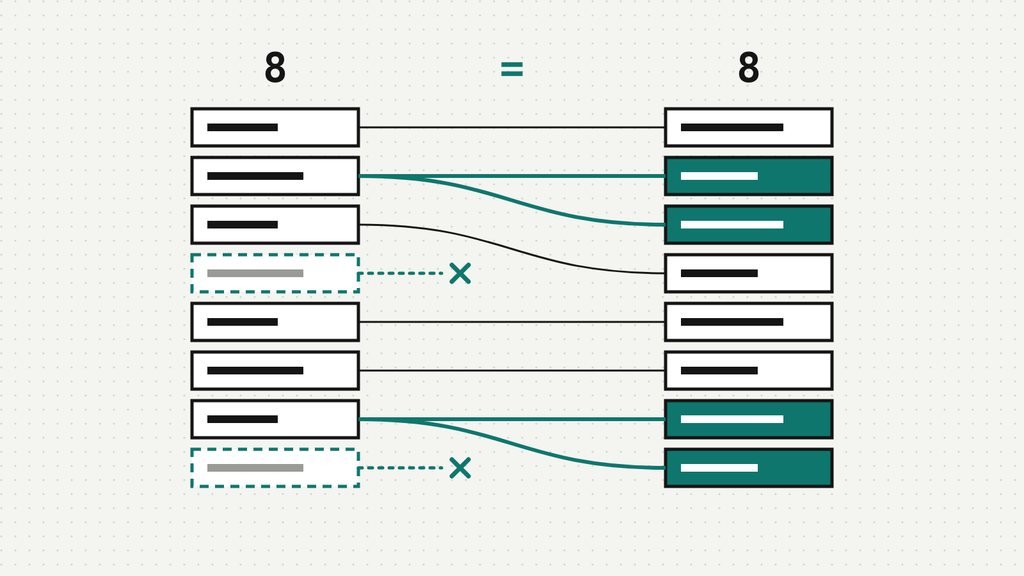
A2 and A7 turn up twice each. A4 and A8 don’t turn up at all. Two rows were added, two were lost, and a check that only looks at the total number of rows saw a perfectly balanced day.
Eight rows in, eight rows out.
Not the same eight.
Two culprits, one alibi
The catalogue explains both. Look at it with the question in mind:
>>> catalogue
    sku  category
0   MUG   Kitchen
1   TEE  Clothing
2   CAP  Clothing
3  TOTE      Bags
4   TEE   Apparel
>>> set(orders['sku']) - set(catalogue['sku'])
{'SOX'}TEE is listed twice, once as Clothing and once as Apparel, the way a catalogue ends up when someone renames a category by adding a row instead of editing one. A merge doesn’t know which row you meant, so it takes both: every TEE order becomes two rows, and its amount is counted twice. That’s the extra £54 (£18 plus £36). The rule is plain multiplication. If a key appears twice on the right, each matching row on the left comes out twice; three rows on one side meeting two on the other come out as six:
>>> a = pd.DataFrame({'k': ['x', 'x', 'x']})
>>> b = pd.DataFrame({'k': ['x', 'x']})
>>> len(a.merge(b, on='k'))
6
SOX is the other culprit: new socks, launched this week, not yet in the catalogue. And here’s the detail that makes the whole thing work. merge without a how= is an inner join. It keeps only the keys found on both sides, so the two SOX orders, £15 between them, were dropped with no message at all.
Had we written how='left', the alibi would have collapsed on the spot:
>>> left = orders.merge(catalogue, on='sku', how='left')
>>> print(len(left), left['amount'].sum())
10 196
Ten rows from eight, and the row check fails as loudly as you could want. It took the default inner join, quietly losing two sock rows to match the two extra T-shirt rows, to make the row count look innocent.
Make the merge say what it expects
The fix isn’t a cleverer count. It’s telling pandas what shape the join should have, so it can refuse when the data disagrees. Orders to catalogue is many to one: many orders per product, one catalogue row per product. Say so:
>>> orders.merge(catalogue, on='sku', how='left', validate='many_to_one')
Traceback (most recent call last):
  ...
pandas.errors.MergeError: Merge keys are not unique in right dataset; not a many-to-one merge

Duplicates in right:
 sku
TEE ...
pandas checks the keys before it joins anything, and even names the culprit. Choose the expectation that matches the data, though. The four options promise different things, and on these tables three of them raise; 'many_to_many' promises nothing, so it never will.
For the other culprit, use indicator=True. It adds a _merge column saying where each row’s key was found, which turns “rows that found nothing” from a mystery into a count. (We’ve dropped the duplicate first, so each order is counted once.)
>>> check = orders.merge(catalogue.drop_duplicates('sku'), on='sku',
...                        how='left', indicator=True)
>>> check['_merge'].value_counts()
_merge
both          6
left_only     2
right_only    0
Name: count, dtype: int64
Two orders found no partner. They’re the socks.
The fix is a decision, not a function
It’s tempting to finish with drop_duplicates('sku') and move on. Look at what it does:
>>> catalogue.drop_duplicates('sku')
    sku  category
0   MUG   Kitchen
1   TEE  Clothing
2   CAP  Clothing
3  TOTE      Bags
>>> catalogue.drop_duplicates('sku', keep='last')
sku category
0 MUG Kitchen
2 CAP Clothing
3 TOTE Bags
4 TEE ApparelIt keeps the first row it meets, unless told otherwise, so T-shirts are Clothing or Apparel depending on the order the catalogue happens to be stored in. That isn’t a fix; it’s a decision made by row order. The real answer comes from whoever owns the catalogue. Ours, being imaginary, said Clothing. Then the merge gets all the checks at once:
>>> cat = catalogue[catalogue['category'] != 'Apparel']  # owner: Clothing
>>> fixed = orders.merge(cat, on='sku', how='left', validate='many_to_one')
>>> fixed['category'] = fixed['category'].fillna('Uncategorised')
>>> assert len(fixed) == len(orders)
>>> assert fixed['amount'].sum() == orders['amount'].sum()
>>> fixed.groupby('category')['amount'].sum()
category
Bags             22
Clothing         69
Kitchen          36
Uncategorised    15
Name: amount, dtype: int64
£142 across four categories, socks included, and two assert lines that will fail loudly the next time the catalogue grows a twin.
- Before: is the key unique on the side that should be “one”?
catalogue['sku'].is_unique - During: write
how=andvalidate=out in full. Defaults are decisions you didn’t make. - After: is each left-hand id still unique, and is the total of every amount unchanged?
- Leftovers:
indicator=Truetells you which rows found no partner, and how many.
Every output above was produced by running the code in pandas 3.0.5.
The checks that pass for the wrong reason
The duplicate doesn’t bother us much, and nor do the missing socks; catalogues are messy, it’s practically their job description. What bothers us is that the check we’d all have run came back green, and came back green because two unrelated mistakes happened to be the same size in rows. In money they weren’t even close: £54 one way, £15 the other.
A row count, a total, a key check: each one can be fooled by a coincidence the others would catch. If a passing check can be two failures in disguise, how many different checks does it take before green actually means something?
References
- groupby, merge and reshape (cheat sheet) — merge with validate= and indicator=, and the check on rows and totals after every step
- Merging & Joining (PlexPrep lesson) — how=, many-to-one against many-to-many, indicator and validate, with quizzes
- Pandas Merge and Join (PlexPrep cheat sheet) — every how=, duplicate keys and validate=, with quizzes
- SQL Joins Without Surprises (cheat sheet) — the same fan-out in SQL, with a sum 18.2 times too big
- Reconciliation and Tie-Out Checks (cheat sheet) — counting rows and totals around a join, in DuckDB
- pandas: DataFrame.merge — how defaults to inner; what each validate= option checks; indicator=
- pandas user guide: Merge, join, concatenate and compare — duplicate keys give the Cartesian product; key uniqueness is checked before the merge
- pandas: DataFrame.drop_duplicates — keep=’first’ is the default
Related essays

▱
Analytics thinking
|
▱
Python
|
▱
Data quality
|
Comments
No comments yet. Be the first to share your thoughts.